
Contractors: One Week to Fix Field Office Communication, Guard WIP
Field-office communication is the flow of information between job site crews and back-office staff on scheduling, progress, costs, and changes. The single best move you can make this week is to standardize one daily report template, require it from every crew lead, and hold a 10-minute daily sync between field and office before the next shift starts. Layer in mobile reporting once that habit sticks.
TL;DR:
- Standardizing daily report templates and conducting daily 10-minute syncs significantly improve data accuracy, decision-making speed, and billing practices.
- Clear ownership, strict escalation rules, and consistent documentation for RFIs and change orders prevent delays and protect project margins.
- Implementing minimal, role-specific standardized forms and photo standards reduces rework, schedule slips, and billing inaccuracies.
- Running small pilot programs with selected crews and measuring KPIs like RFI response time and percent-complete alignment ensures effective adoption before scaling.
- Offline-capable mobile apps with clear file-naming conventions, combined with tracking key performance metrics, enable reliable reporting on job sites with poor connectivity.
Table of Contents
- Why Field-Office Communication Matters More Than Most Budgets
- How Field-Office Communication Actually Breaks Down
- Practical Strategies That Bridge the Field-Office Gap
- Introducing Technology Without Losing the Human Element
- Standardizing Daily Reports, RFIs, Change Orders, and Procurement
- Mobile Connectivity and Data Capture on Unreliable Sites
- KPIs That Show Whether Field-Office Communication Is Working
- Your One-Week Action Plan
- How R Construction Solutions LLC Rolls This Out With Clients
- Why We Treat Communication as a Margin Lever, Not a Soft Skill
- Sources
Why Field-Office Communication Matters More Than Most Budgets
Poor communication between your job site and your office is not a soft problem. It shows up directly in your bank account, in your schedule, and in your bid-to-award ratio. Every day a foreman’s update sits unread in a text thread, your estimator is pricing the next job on stale cost data.
A 2021 study on capital project performance found that a 1% improvement in communication practices correlated with a 0.705% gain in technical competence and a 1.120% gain in managerial competence, producing an overall performance lift of 0.767%. That is not a rounding error on a multimillion-dollar job. A separate longitudinal study using structural equation modeling found the effect works mostly through improved managerial and technical competencies, not through communication alone. In plain terms: talking more doesn’t help if your team’s underlying project management skills stay flat. You need both.
Communication gaps cost more than a delayed email. Rework, percent-complete drift on your work-in-progress schedule, and delayed billing all trace back to the same root cause: field and office not agreeing on the same version of reality.
Miscommunication is repeatedly identified in construction research as a leading cause of rework and schedule delays. A 2022 meta-network analysis also found that dynamically monitoring key information flow paths, rather than just increasing message volume, reduces time and cost overruns and supports faster decision-making. The lesson: fix the paths information travels through, not just the frequency of updates.
For a growth-stage contractor doing $1 million to $10 million a year, this is a margin problem before it’s a communication problem. Every point of rework or billing lag eats into the thin margins that separate a profitable year from a break-even one.
How Field-Office Communication Actually Breaks Down
Most communication failures on job sites don’t look dramatic. They look like small, everyday shortcuts that compound into real financial damage. Paper logs get left in a truck. A change order gets verbally approved on site but never documented. A text chain scatters photos, decisions, and dates across a dozen threads with no single source of truth.
Here’s how the common failure modes actually cost you money:
- Paper daily logs: information sits on a clipboard for days before the office sees it, delaying billing and masking schedule slips.
- Scattered spreadsheets: every super builds their own version, so the PM reconciles conflicting numbers manually instead of managing the job.
- Unstructured text chains: photos, approvals, and instructions get buried in scroll history with no timestamp trail, which becomes a real liability if a change order is disputed later.
- Late RFIs: a question that should take a day to answer sits for a week because nobody owns the follow-up, and the crew works around it, guessing.
- Verbal-only change orders: field crews proceed on a handshake, and the office has no documentation to bill against, which is a direct path to underbilling.
Each of these connects to the same downstream problem: your work-in-progress numbers stop reflecting reality. Field progress that isn’t captured daily causes WIP drift, and that drift shows up as underbilling that pressures cash flow right when you need it most. A late RFI on a Tuesday can push a concrete pour to Friday, and Friday’s crew still gets paid whether the pour happens or not.
Practical Strategies That Bridge the Field-Office Gap
You don’t need new software to fix most of this. You need discipline, clear ownership, and a handful of standardized templates that everyone actually uses. Here’s the sequence R Construction Solutions LLC recommends to contractors working through this exact problem.
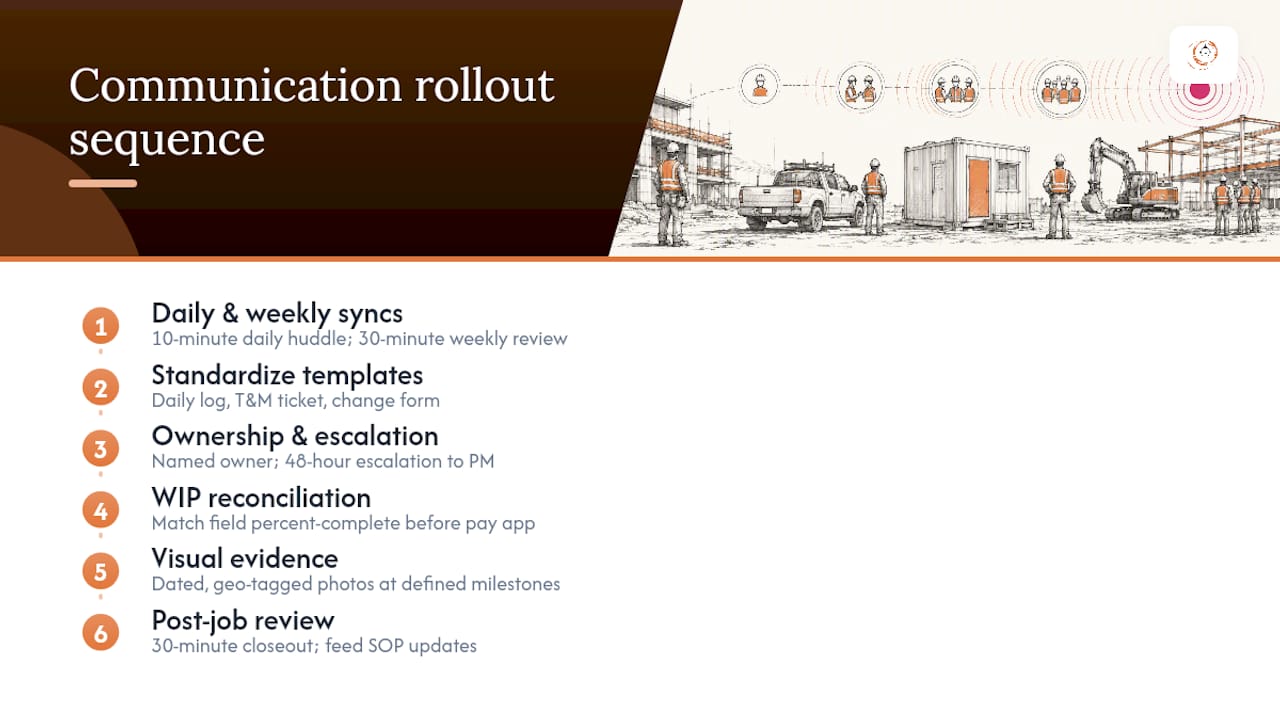
1. Set a daily and weekly sync cadence. Run a 10-minute daily huddle between the field lead and the office, first thing in the morning or last thing at night. Keep the agenda to three questions: What got done yesterday? What’s blocking today? What decisions are outstanding? Add a 30-minute weekly review covering the full schedule, budget-to-actual, and upcoming procurement needs.
2. Standardize your templates. A daily log, a time-and-materials ticket, and a change order form should look identical no matter which crew fills them out. Standardized, minimal daily reporting paired with scheduled quick syncs outperforms ad-hoc communication because it creates predictable handoffs your accounting team can plan around. Our guide on daily field reports breaks down the minimum fields worth capturing.
3. Assign clear ownership and escalation rules. Every RFI needs a named owner and a deadline, not a general inbox it disappears into. Every change order needs one person authorized to approve it in the field and one person in the office who logs it before work continues. Escalation should be automatic: if an RFI sits unanswered for 48 hours, it goes to the PM, no exceptions.
4. Align field updates with WIP before you send a pay app. This is the step most contractors skip, and it’s the one that protects your margin. Percent-complete numbers reported from the field should match the percent-complete numbers on your WIP schedule before billing goes out. Treat this reconciliation as a financial control, not a formality.
5. Set visual evidence standards. Require dated, geo-tagged photos at defined milestones, not just when something goes wrong. Case examples from construction technology vendors show photo and video evidence reducing QC inspection time significantly because disputes get resolved by looking at the record instead of arguing about memory.
6. Run a short post-job review. Thirty minutes at closeout, with the super and PM in the room, to capture what broke down and what worked. Feed that into next quarter’s SOP updates instead of letting it evaporate.
Pro Tip: Name your photos by date, location, and task before you upload them anywhere. A folder full of “IMG_4021.jpg” files is functionally the same as no photos at all when a billing dispute lands on your desk six weeks later.
Sequencing matters here. Get the daily sync and one standardized template running first. Everything else layers on top once that habit is in place.
Introducing Technology Without Losing the Human Element
Technology should follow process, not replace it. Buy a tool only after you’ve identified a repeatable pain point that a template and a phone call can’t solve at scale, like a super who has to retype the same daily log into three different systems.
Before you sign a contract with any vendor, run a small pilot. Test the tool with one crew on one project phase for four to six weeks, and measure adoption alongside downstream effects on billing and WIP accuracy before rolling it out company-wide.
When you do evaluate tools, look for a specific set of capabilities:
- Mobile-first design that works on a phone in a gloved hand, not a desktop interface shrunk down.
- Offline capture with auto-sync, since half your job sites won’t have reliable signal.
- Role-based views so a super sees what a super need and your controller sees what a controller needs, without either wading through the other’s clutter.
- Integration with your existing accounting or PM system, so field data updates WIP without manual re-entry.
Autodesk’s guidance on field-office communication points to the same core elements: mobile access, a centralized hub, documented SOPs with version control, and leadership that models the new behavior instead of just mandating it from an email memo. A detailed guide to mobile tools can help you compare device and connectivity strategies before you commit to a platform.
Pro Tip: Train your most skeptical superintendent first, not your most tech-savvy one. If the tool wins over the person most likely to go back to paper, everyone else follows without a fight.
Standardizing Daily Reports, RFIs, Change Orders, and Procurement
A daily log needs only a handful of fields to be useful: date, crew size, work completed, materials delivered, weather delays, safety incidents, and photos tied to specific tasks. A T&M ticket needs labor hours by trade, equipment used, materials consumed, and a signature from a site contact confirming the work happened.
RFIs and change orders both need a defined lifecycle, not an open-ended conversation:
- RFI submitted by the field, with a specific question and photo reference.
- RFI logged by the office within four hours, with an owner assigned and a target response date.
- RFI answered in writing, never verbally, so there’s a record if the answer gets disputed later.
- CO drafted the moment scope changes, with cost and schedule impact attached before work proceeds.
- CO approved by an authorized signer on both sides, logged in the system before the crew continues.
The connective tissue between all of this and your bottom line is billing. Field documentation only protects your margin if it feeds directly into your WIP updates before a pay app goes out the door. Our breakdown of process improvement for construction firms walks through how to map this handoff so nothing falls through the crack between the field and the estimator.
Mobile Connectivity and Data Capture on Unreliable Sites
Most job sites don’t have great signal, and your reporting workflow has to assume that from day one. Standard smartphones with rugged cases handle most field conditions fine. You don’t need to issue specialized hardware unless your crews are working in extreme environments.
The app matters more than the device. Look for offline-first behavior: the app should let a foreman fill out a log with zero signal, then auto-sync the moment the phone finds a connection, without requiring anyone to remember to hit “send.” Photos and short videos should attach automatically to the relevant task rather than living in a separate camera roll.
For capture standards, keep it simple enough that a tired crew lead at the end of a 10-hour shift will still do it:
- One photo minimum per major task milestone, geo-tagged and timestamped automatically.
- A 30-second video walkthrough for anything complex or disputed, like a foundation pour or a utility conflict.
- Consistent file naming or automatic task-tagging so nobody has to hunt through a camera roll during a billing dispute.
- A single upload point at end of day, not a scattershot of texts sent throughout the shift.
KPIs That Show Whether Field-Office Communication Is Working
You can’t manage what you don’t measure, and communication is no exception. A handful of metrics tell you whether the changes above are actually landing or just adding paperwork.
| KPI | What it captures | Target range | How to read it |
|---|---|---|---|
| RFI response time | Hours or days from submission to written answer | Under 48 hours | Longer than this signals an ownership gap, not a workload problem |
| Change order cycle time | Days from scope change identified to CO approved | Under 5 business days | Slow cycles usually mean verbal approvals are happening off the books |
| Percent-complete alignment | Difference between field-reported and WIP-scheduled progress | Within 5 percentage points | A wide gap means your billing is built on stale data |
| Rework rate | Percentage of labor hours redone due to error or miscommunication | Trending downward quarter over quarter | A flat or rising rate points back to unclear instructions or missed handoffs |
| Days sales outstanding (DSO) | Average days to collect payment after invoicing | Trending toward your industry benchmark | Rising DSO often traces back to disputed billing from poor documentation |
Pull RFI and CO timestamps straight from your tracking log, calculate percent-complete alignment by comparing field daily reports to your WIP schedule, and track rework hours as a separate cost code so it doesn’t hide inside general labor. Our KPI field guide covers how to build these into a weekly reporting rhythm.
Your One-Week Action Plan
You don’t need a quarter to see movement here. Run this over the next seven working days.
- Day 1: Pick one daily report template and mandate it for every crew lead, starting tomorrow morning.
- Day 1: Schedule a recurring 10-minute daily sync between field leads and the PM, same time every day.
- Day 2 to 3: Enforce three documentation standards immediately: photo at every task milestone, written RFI answers only, and a signed T&M ticket before payroll gets processed.
- Day 4 to 5: Pick one crew and pilot a digital daily report tool, even a simple shared form, alongside the paper process as a bridge.
- Day 6 to 7: Compare the pilot crew’s data quality and turnaround time against your other crews, and decide whether to expand it next week.
How R Construction Solutions LLC Rolls This Out With Clients
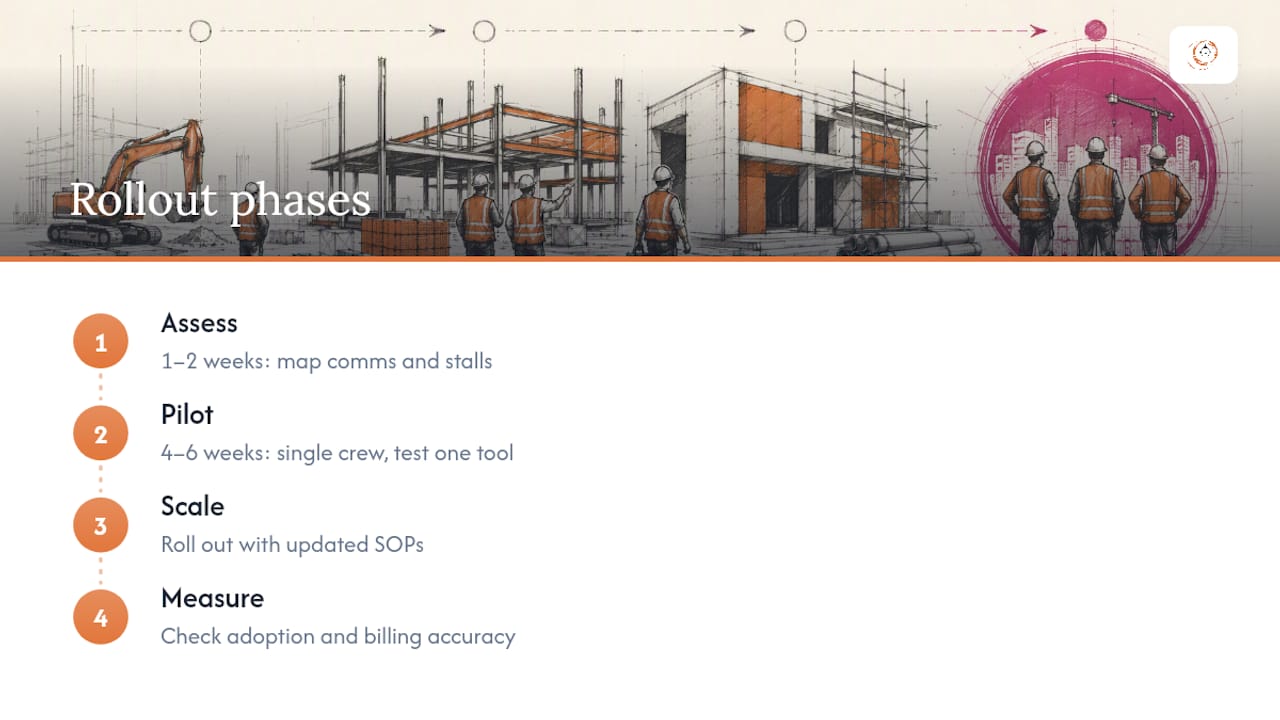
The rollout that actually sticks follows four phases: assess, pilot, scale, measure. The assessment phase, typically one to two weeks, maps current communication paths and pinpoints where information stalls between field and office. The pilot runs four to six weeks with a single crew, testing one new template or tool before touching the rest of the company. Scaling happens only after the pilot data shows real improvement in adoption and billing accuracy, and it comes paired with updated SOPs so the change survives past the first excited month.
The most common pitfall we see in consulting engagements is skipping the pilot and rolling a new system out company-wide on day one. Adoption collapses because nobody had time to build the habit before the pressure of a live, multi-crew job hit.
Contractors who protect margin best are the ones who treat field reporting as a financial control, not paperwork. That single shift in mindset changes how a crew fills out a daily log.
It’s usually a missing daily sync or an unclear owner for follow-up questions.*
Why We Treat Communication as a Margin Lever, Not a Soft Skill
Communication gaps drain margin quietly, through rework, WIP drift, and billing delays that compound over a fiscal year. We approach every advisory engagement the same way: map where information actually breaks down between field and office, fix the highest-cost gap first, and build the SOP around it before adding any technology. That sequence is what separates a contractor who scales past $5 million from one who stays stuck rebuilding the same fires every quarter.
If your site photos and marketing imagery still show the same demographic in every shot, it’s worth diversifying that visual library. Construction teams are far more varied in race and gender than most stock photography suggests, and your marketing should reflect the crews actually doing the work.
— Rowena Tulacz
If you’re ready to map your own communication gaps and build a rollout plan around them, R Construction Solutions LLC’s consulting services start with exactly the kind of assessment described above.
Sources
- Impact of Communication on Capital Project Performance: A Mediated Moderation Model
- Meta-network analysis for communication optimization in construction projects
- 9 Ways to Improve Field-to-Office Communication in Construction
Recommended
- Daily Field Reports for Contractors: 2026 Best Practices
- Project Commissioned: Your 30-90 Day Post-Award Playbook
- Construction Workflow Optimization: A 2026 Guide for Contractors
- How to Protect Yourself Hiring a Construction Project Manager
Running the job and the business at the same time? One short email a week — change orders, billing, job costing, scheduling. Free, no pitch. Subscribe.
Free and unconditional. No call required, no obligation, unsubscribe anytime.

