
Integrated Estimating Workflow: A Guide for Construction PMs
An integrated estimating workflow makes the estimate the single, living source of cost truth across design, preconstruction, and execution. Rather than treating the estimate as a one-time deliverable that gets rebuilt at each handoff, this approach connects design, takeoff, estimating, and ERP into one continuous process where every cost decision traces back to a validated, version-controlled baseline.
TL;DR:
- Core benefit: Fewer transcription errors, faster budget setup, and real-time variance tracking because data flows forward without being re-keyed.
- Primary approach: Link BIM or takeoff outputs to your estimating platform, then push the approved estimate directly into your ERP or job-cost system using native integration or middleware.
- Immediate next step: Audit your current handoffs. Identify exactly where data gets re-entered manually between takeoff, estimate, and finance, and treat that gap as your pilot target.
For a copy-ready starter plan, jump to the operational checklist in Section 10.
Table of Contents
- What does an integrated estimating workflow actually cover?
- What are the core components that make the workflow function?
- What are the real benefits and ROI of an integrated estimating process?
- Why do integrated workflows break down, and how do you spot it early?
- How do you implement an integrated estimating workflow step by step?
- Which data standards and tools do you need for integration?
- What KPIs should you track, and how long does implementation take?
- Short case snapshots: what does integration look like in practice?
- Operational checklist and roles template to start your pilot
- Key Takeaways
- Why data governance matters more than the software you choose
- How R Construction Solutions LLC helps you build this workflow
- Useful sources and standards to consult
What does an integrated estimating workflow actually cover?
The scope is specific: an integrated estimating workflow connects the phases where cost data is created, validated, and consumed. That means the linkages between design or BIM authoring, quantity takeoff, the estimating platform, procurement, and ERP-driven project accounting. When those connections are live, a quantity change in the model flows through to the estimate, and the approved estimate pushes directly into the job-cost budget without anyone rebuilding it in a spreadsheet.
What it does not automatically cover: field timekeeping systems, vendor CRMs, or subcontractor bid portals unless those tools are explicitly integrated. The workflow ends where data leaves the cost-control environment and enters systems that operate on different data models.
The organizational shift matters as much as the technology. Data standardization and cost-code alignment across estimating, BIM, project management, and finance teams are the primary barriers to successful integration, not the software selection itself.
Roles that must be defined before you start:
- Preconstruction lead: owns the estimate structure and approves the baseline
- BIM manager or modeler: responsible for LOD alignment and quantity exports
- Estimator: builds and maintains the cost database and line-item logic
- Procurement: validates buyout alignment against the approved estimate
- Project controls: monitors variance between estimate and actual cost
- Finance/CFO: owns the ERP chart of accounts and approves the cost-code mapping
- IT: manages integration layer, API credentials, and data validation rules
Think of the workflow as a hub-and-spoke diagram with the Common Data Environment (CDE) at the center. Data flows outward from the CDE to the estimating platform, then to ERP and field systems. Every spoke carries a defined data standard, a named owner, and a validation rule. Without that structure, you have connected tools but not an integrated workflow.
Pro Tip: Before selecting any software, document the data flows you already have. A one-page map showing where data originates, where it goes, and who touches it in between will surface your highest-value integration points faster than any vendor demo.
What are the core components that make the workflow function?
Seven components must be in place for the workflow to hold together. Missing any one of them creates a gap where data degrades or gets re-entered manually.
-
Source quantities (takeoff or BIM). Quantities must come from a single authoritative source, whether that is a BIM model, a cloud-based takeoff tool, or both. BIM integration validates quantities, supports procurement planning, and lets teams review quantity deltas when model revisions occur, before those changes become field cost overruns.
-
Cost database and price library. A centralized, version-controlled price library ensures every estimator pulls from the same labor rates, material costs, and production factors. Without it, two estimators on the same project can produce different unit costs for identical work.
-
Estimate structure and cost codes. The estimate must be organized using the same cost-code taxonomy the ERP uses. This is the single most common failure point: estimates built in one code structure that must be manually remapped before they can be loaded into the job-cost system.
-
Integration layer or API. This is the mechanism that moves data between systems. It can be a native connector (built into the estimating platform), a middleware tool, or a custom API. Middleware lets small-to-mid-sized contractors keep existing tools while achieving integration benefits, avoiding a full-stack replacement.
-
Version control and approvals. Every estimate revision must be tracked, dated, and tied to an approval. Unapproved edits that bypass version control are the fastest way to lose budget integrity.
-
ERP and job-cost mapping. The approved estimate must map cleanly to the ERP’s work breakdown structure so the budget loads without manual translation. This mapping document is a governance artifact, not a one-time setup task.
-
Feedback loop from field performance. Connecting estimating and execution creates a feedback loop that helps teams understand variances and sharpen future bids. Actual cost data flows back to the estimating team, improving the price library and production factors over time.
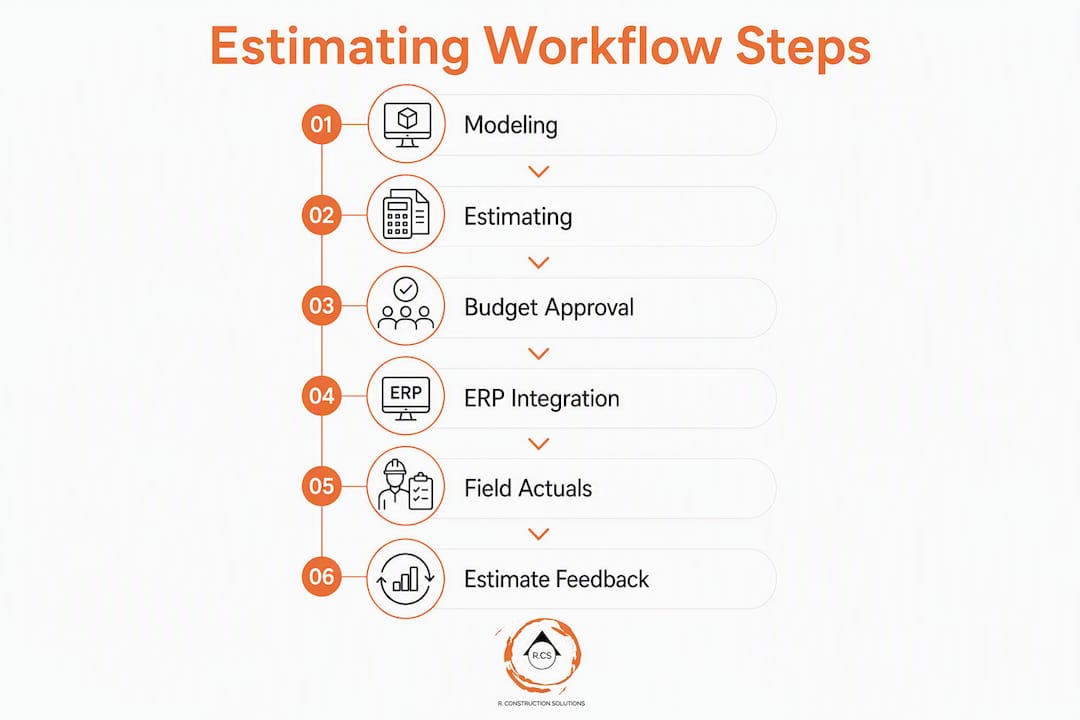
The data flow looks like this: model or takeoff → estimate → approved budget → ERP → field actuals → estimate feedback. Each arrow represents a defined integration point with a named owner and a validation rule.
Pro Tip: Start with one trade package, not the whole project. Pick a package where you have clean drawings, a reliable cost history, and an estimator willing to test the process. A narrow pilot produces repeatable mapping rules you can apply across the portfolio.

Comparative research on traditional versus modern estimating methods recommends blending approaches rather than wholesale replacement, particularly for firms balancing accuracy gains against training overhead. That finding supports a middleware-first strategy: keep what works, connect what needs to connect.
What are the real benefits and ROI of an integrated estimating process?
The business case is straightforward. Manual handoff and transcription can account for a substantial portion of non-value-added administrative time in preconstruction workflows. Eliminating those handoffs does not just save time; it removes the error-introduction points that cause budget discrepancies, procurement misalignment, and downstream change orders.
Primary benefits by phase:
- Pre-award: Faster bid assembly because takeoff quantities flow directly into the estimate without re-entry; better subcontractor scope alignment because the estimate structure is consistent.
- Award to mobilization: The approved estimate pushes directly into the ERP budget, eliminating the manual rebuild that typically takes days and introduces remapping errors.
- Execution: Real-time variance tracking because actuals post against a budget that matches the original estimate structure. Teams can see cost trends early enough to act.
- Closeout and future bids: Field performance data feeds back into the price library, improving future estimate accuracy on similar work.
Metrics worth tracking from day one:
| Metric | What it measures | Why it matters |
|---|---|---|
| Estimate accuracy % | Planned cost vs. as-built cost | Validates whether integration improved cost prediction |
| Manual re-entry events | Number of times data is re-keyed per estimate | Direct measure of integration effectiveness |
| Bid turnaround time | Hours from drawings received to estimate submitted | Tracks efficiency gains in preconstruction |
| Change-order rate | Number and dollar value of owner-initiated changes | Signals whether scope was captured accurately at bid |
| Forecast variance | Difference between current forecast and original budget | Measures execution-phase cost control |
Cloud-based estimating platforms enforce reusable line items, centralized price databases, and exports tailored to downstream systems, reducing the spreadsheet drag that inflates manual re-entry counts. The first tangible return typically appears pre-award, in faster bid assembly and fewer scope gaps. The second, often larger return shows up early in execution, when the budget loads cleanly into the ERP and the project controls team can start variance tracking promptly rather than spending weeks reconciling a manually rebuilt budget.
Why do integrated workflows break down, and how do you spot it early?
Most integration failures are not technology failures. They are data-governance failures that the technology makes visible. The biggest risk is poor cost-code mapping: linking systems without strict mapping rules, validation logic, and version control propagates flawed assumptions into the ERP, where errors become harder to trace and more expensive to correct.
Red-flag warning signs:
- Estimators are editing the approved budget directly in the ERP rather than through a formal change-order process.
- Duplicate cost records exist in both the estimating platform and the ERP with different values.
- Unit measures are inconsistent across systems (e.g., linear feet in the estimate, square feet in the ERP).
- Model LOD does not match what the estimating team needs to produce reliable quantities.
- Approvals are informal or undocumented, so no one can identify who authorized a budget change.
- Procurement commitments are not synced back to the estimate baseline, creating silent overruns.
Common failure modes, ranked by frequency:
- Poor cost-code mapping. Estimate codes do not align with ERP codes, forcing manual remapping at every award.
- Mismatched LOD expectations. Design teams produce models at LOD 200 when estimating needs LOD 300 quantities.
- Weak version control. Multiple estimate versions circulate without a clear baseline, and the ERP loads the wrong one.
- Unmanaged assumptions. Allowances and exclusions in the estimate are not carried forward into the ERP budget, creating phantom budget lines.
- No feedback loop. Field actuals never reach the estimating team, so the price library never improves.
Quick mitigations:
- Establish a cost-code mapping document before any integration goes live, and require sign-off from both estimating and finance.
- Lock the approved estimate baseline immediately at award; all subsequent changes must go through a formal change-order process that updates both the estimate and the ERP.
- Schedule a weekly variance review in the first 90 days of execution to catch mapping errors before they compound.
- Align with the BIM manager on LOD requirements at the start of preconstruction, not after the model is already built.
Pro Tip: The mapping document is a living governance artifact. Assign one person to own it, version it with every project phase, and require sign-off from both the preconstruction lead and the CFO before any estimate goes to ERP.
How do you implement an integrated estimating workflow step by step?
A phased rollout reduces risk and produces measurable results at each stage. Trying to integrate everything at once is the most common reason implementations stall.
-
Executive sponsorship and charter (Week 1–2) — Owner: CFO or VP of Operations. Define the business case, assign a project sponsor, and document the scope of the pilot. Without executive buy-in, the data-governance decisions that require cross-department cooperation will not get made.
-
Baseline assessment and data mapping (Weeks 2–6) — Owner: Estimating lead and Finance. Audit current estimate structures, ERP chart of accounts, and takeoff outputs. Identify every manual handoff and re-entry point. Produce a gap analysis and a draft cost-code mapping document.
-
Select pilot package and tools (Weeks 4–8) — Owner: Preconstruction lead. Choose one trade package or project type for the pilot. Confirm which tools will be used for takeoff, estimating, and ERP, and identify whether a native connector or middleware is needed. Estimating software that fits your bid process is worth evaluating here before committing to an integration architecture.
-
Build integrations or middleware (Weeks 6–12) — Owner: IT and Estimating. Configure the integration layer, validate data transfer with test records, and document the mapping rules. Test with real estimate data before going live.
-
Pilot and collect variance metrics (Weeks 10–20) — Owner: Project Controls. Run the pilot on a live project or package. Track manual re-entry events, estimate-to-budget variance, and procurement trigger timing. Target: data transfers without manual edits on at least 90% of line items.
-
Refine and scale (Months 3–18) — Owner: CFO and Preconstruction lead. Apply lessons from the pilot to the next project type. Expand the cost-code mapping, train additional estimators, and add integration points (BIM-to-quantity, change-management sync) as the team’s capability grows.
Pilot success metrics to define before you start:
- Data transfer rate without manual edits (target: a high percentage of line items transfer cleanly)
- Estimate-to-budget variance within an agreed tolerance to ensure accuracy at award
- Procurement trigger timing: purchase orders issued within a defined window after award
High-performing contractors typically start with estimate-to-budget transfer, BIM-to-quantity alignment, and change-management synchronization as their first three integration priorities, in that order. Starting with estimate-to-ERP gives you the fastest measurable return and the governance foundation the other integrations depend on.

Which data standards and tools do you need for integration?
Getting the data standards right before selecting tools is the decision that most contractors get backwards. The tools are interchangeable; the data standards are not.
Data standards to define first:
- Cost-code taxonomy: A single, agreed list of cost codes used by estimating, procurement, and the ERP. Every integration depends on this.
- Work breakdown structure (WBS): How the project is divided into billable and trackable units of work.
- Unit definitions: Linear feet, square feet, cubic yards, tons. Inconsistent units between takeoff and ERP are a persistent source of mapping errors.
- Level of Development (LOD): Preconstruction and design teams must agree early on model LOD and data expectations. Without that alignment, the model will not reliably produce quantities suitable for estimating.
- Price database semantics: How labor rates, material costs, and equipment costs are structured and versioned in the estimating platform.
Tool categories and their role in the workflow:
- BIM authoring (e.g., Autodesk Revit, Trimble Tekla): Produces the model and quantity exports; LOD alignment is critical here.
- Automated takeoff platforms: Extract quantities from drawings or models; output feeds the estimating platform.
- Estimating platform: Applies cost logic to quantities; produces the structured estimate that becomes the budget.
- Middleware or API layer: Moves data between systems without manual re-entry; often the least disruptive path for firms that cannot replace their ERP.
- ERP or job-cost system (e.g., Sage, Viewpoint, Acumatica): Receives the approved estimate as the project budget; tracks actuals against it.
- Field data sources: Time and material records, daily reports, and subcontractor invoices that feed actuals back to project controls.
Integration priority table:
| Integration point | Business value | Implementation effort |
|---|---|---|
| Estimate → ERP baseline transfer | High: eliminates budget rebuild at award | Low–Medium: often a native connector or simple export |
| BIM → quantity validation | High: reduces takeoff errors and scope gaps | Medium: requires LOD alignment and export mapping |
| Procurement/commitment sync | Medium: aligns buyout to estimate baseline | Medium: requires PO system integration |
| Change-management loop | High: keeps forecast current through execution | Medium–High: requires workflow rules and approvals |
| Field actuals → estimate feedback | Medium: improves future bid accuracy | Low: often available in existing ERP reporting |
Pro Tip: API-first or middleware-first integration is usually the right call for firms doing $1M–$10M in annual revenue. You keep your existing ERP and estimating tools, add a connector, and get the data flow you need without a platform replacement that disrupts every project in flight. Check the Buildberry blog for current thinking on AI-assisted takeoff and how it fits into this architecture.
What KPIs should you track, and how long does implementation take?
KPIs for an integrated estimating process fall into two categories: process health metrics that tell you whether the integration is working, and business outcome metrics that tell you whether it is producing value.
KPI list:
- Estimate accuracy %: Planned cost vs. as-built cost by trade or phase. Improving this over successive projects is the clearest signal that the feedback loop is working.
- Forecast variance: Difference between the current cost forecast and the original approved budget. A connected workflow makes this visible in real time rather than at month-end.
- Manual re-entry events per estimate: Count every instance where data is re-keyed between systems. The target is zero; the baseline is usually higher than teams expect.
- Bid turnaround time: Hours from drawings received to estimate submitted. Integration typically reduces this by eliminating duplicate quantity work.
- Procurement lead time: Days from award to first purchase order. A clean estimate-to-ERP transfer accelerates this significantly.
- Change-order rate and dollar impact: Frequency and cost of owner-directed changes. Better scope capture at bid reduces this over time.
Typical implementation timeline:
- Baseline assessment: 2–6 weeks, depending on the number of systems and the state of existing data.
- Pilot (one package or project type): 6–12 weeks from integration build to first live data transfer.
- Initial scale (two to four project types): 3–9 months, including training and mapping refinement.
- Full organizational rollout: 9–18 months for most firms, depending on portfolio size and system complexity.
Primary cost drivers to budget for: integration development or middleware licensing, data cleansing (especially cost-code harmonization), and estimator training on the new workflow. Data cleansing is consistently underestimated. Firms that skip it spend the first six months of execution correcting mapping errors rather than tracking variance. For estimating best practices that apply across this timeline, the guidance on baseline assessment and cost-code discipline is directly applicable.
Short case snapshots: what does integration look like in practice?
These three anonymized examples illustrate different entry points and outcomes. Each reflects a real pattern seen across construction firms at different stages of integration maturity.
Case 1: Design-build GC using BIM-linked estimating
A mid-size design-build general contractor was losing preconstruction hours to quantity reconciliation every time the design team issued a model revision. The problem: quantities were being re-extracted manually from updated drawings rather than pulled from the model. The integration approach was to connect the BIM authoring tool directly to the takeoff platform, with LOD 300 as the agreed threshold for quantity extraction. The outcome was a significant reduction in quantity reconciliation time per revision cycle, and the estimating team could review cost impacts of design changes within hours rather than days. The lesson: LOD alignment between design and preconstruction is the prerequisite, not the afterthought.
Case 2: Mid-size GC keeping existing ERP with middleware
A general contractor doing commercial tenant improvement work had a well-established ERP they were not willing to replace. Their estimating platform had no native ERP connector. The integration approach was a middleware layer that mapped estimate line items to ERP cost codes using a translation table maintained by the finance team. The outcome was that budget setup time at award dropped from two to three days to under four hours, and the project controls team could start variance tracking from the first week of execution. The lesson: middleware is not a compromise. For firms with stable ERPs and growing estimating volume, it is often the right permanent architecture.
Case 3: Specialty subcontractor standardizing cost codes
A mechanical subcontractor was experiencing procurement lag because purchase orders were being built from the estimate manually, with frequent mismatches between estimate line items and the procurement system’s item codes. The integration approach was process-first: standardize the cost-code taxonomy across estimating and procurement before touching any software. Once the codes aligned, a simple export-and-import routine replaced the manual PO build. Procurement lead time dropped measurably, and the estimating team stopped fielding calls from the purchasing coordinator asking what a line item meant.
The lesson that cuts across all three cases: the technology is the easy part. The hard part is getting estimating, finance, and operations to agree on a shared data language before the first integration goes live. That agreement is what makes the connection durable.
When to choose each approach:
- Full-platform integration: Best when you are replacing your ERP or estimating platform anyway and can design the connection from scratch.
- Middleware-first: Best when your ERP is stable and your estimating volume is growing faster than your manual capacity.
- Process-first: Best when your biggest problem is data inconsistency, not software capability. Fix the taxonomy before adding connectors.
Operational checklist and roles template to start your pilot
Use this checklist to scope a pilot or prepare for a vendor assessment. It is designed to be copied and adapted to your firm’s chart of accounts and project types.
Implementation checklist
- Scoping: Define pilot scope (one trade package or project type), identify systems in scope, and document current handoffs.
- Data inventory: Audit estimate templates, ERP chart of accounts, takeoff outputs, and existing cost-code lists.
- Mapping: Build the cost-code mapping document; get sign-off from estimating lead and CFO.
- Pilot build: Configure integration layer or middleware; test with historical estimate data before going live.
- Training: Train estimators, project controls staff, and procurement on the new data flow and approval process.
- Acceptance criteria: Define what “success” looks like (data transfer rate, variance tolerance, procurement timing).
- Scale plan: Document lessons from the pilot; identify the next two project types to add and the additional mapping rules required.
For a more detailed version, the estimating checklist for general contractors from R Construction Solutions LLC covers the pre-award steps in depth.
RACI roles template
| Role | Scoping | Data mapping | Pilot build | Training | Acceptance | Scale |
|---|---|---|---|---|---|---|
| CFO / Finance | A | A | I | I | A | A |
| Preconstruction lead | R | R | A | R | R | R |
| Estimator | R | R | C | R | R | R |
| BIM manager | C | C | R | C | C | C |
| Procurement | I | C | C | R | C | R |
| IT | I | C | R | C | C | C |
| Project controls | I | C | I | R | R | R |
R = Responsible, A = Accountable, C = Consulted, I = Informed
Sample cost-code mapping row
| Cost code (estimate) | Source system | Owner | Validation rule |
|---|---|---|---|
| 300 (Cast-in-place concrete) | Estimating platform | Estimating lead | Unit = CY; must match takeoff quantity within 2% |
Pro Tip: Governance sign-off is not a formality. Require the CFO and preconstruction lead to co-sign the cost-code mapping document before any integration goes live. That single step prevents the most common post-launch failure: finance and estimating discovering they defined the same code differently.
Pro Tip: When building stakeholder alignment, frame the pilot in terms of budget setup time and change-order reduction, not technology capability. Executives approve investments in outcomes, not integrations.
When you are ready to staff the estimating function for this workflow, the construction estimator hiring checklist covers the competencies to look for in candidates who can operate within a connected estimating environment.
Key Takeaways
An integrated estimating workflow succeeds when data standards, governance, and a phased pilot come before software selection.
| Point | Details |
|---|---|
| Data standards first | Define cost codes, unit measures, and LOD expectations before configuring any integration. |
| Pilot one package | Start with a single trade or project type to produce repeatable mapping rules before scaling. |
| Middleware is a valid architecture | Small-to-mid-size contractors can keep existing tools and achieve integration through API connectors or middleware. |
| Map estimate to ERP at award | Push the approved estimate directly into the ERP budget at award to eliminate manual rebuild and mapping errors. |
| R Construction Solutions LLC | Provides estimating support, workflow optimization, and integration advisory to help contractors implement this process without disrupting active projects. |
Why data governance matters more than the software you choose
The construction industry has spent the last decade chasing the next estimating platform, the next BIM tool, the next ERP upgrade. What the best-performing contractors have figured out is that the software is not the constraint. The constraint is the shared data language that makes the software work together.
Cost codes are the clearest example. Two estimators at the same firm, using the same platform, can produce estimates that cannot be compared to each other because they organized the work differently. Add an ERP with its own code structure, a BIM model with quantity outputs that do not map to either, and a procurement system that uses vendor item codes instead of cost codes, and you have four systems that are technically connected and practically useless to each other.
The firms that get integration right spend the first phase of implementation on taxonomy, not technology. They get estimating, finance, and operations in the same room to agree on what a cost code means, what a unit of measure means, and who owns the master list. That agreement is the governance foundation. Everything else is configuration.
There is also a tendency to treat the estimate as a point-in-time document rather than a living reference. The most durable integrations treat the estimate the way a good project schedule treats the baseline: it is locked at award, every change goes through a formal process, and the current forecast is always traceable back to the original. That discipline is what makes variance analysis meaningful rather than just a number on a report.
The other underrated priority is the feedback loop. Most firms invest in getting data from estimate to ERP. Far fewer invest in getting field performance data back to the estimating team. That return path is where the price library improves, where production factors get calibrated, and where future bids get sharper. It is also the part of the workflow that requires the least technology and the most organizational commitment.
How R Construction Solutions LLC helps you build this workflow
Contractors who want to move from disconnected spreadsheets to a connected estimating process often know what the destination looks like. The gap is in the sequencing: which data standards to define first, which integration points to prioritize, and how to run a pilot without disrupting the projects already in flight.

R Construction Solutions LLC provides the advisory structure to close that gap. The typical engagement covers a baseline assessment of your current estimating and ERP handoffs, a cost-code mapping exercise with sign-off from both estimating and finance, pilot scoping and integration architecture guidance, training for estimators and project controls staff, and a governance playbook that keeps the workflow intact as your team grows. Engagements are delivered by an experienced advisory team with direct construction industry operations and business development experience, not generic process consultants.
To prepare for an initial assessment, gather a recent estimate, your ERP chart of accounts, and any takeoff outputs you currently produce. That is enough to identify your highest-value integration points and scope a pilot. Contact R Construction Solutions LLC to schedule a working session and get a clear picture of what your integrated estimating workflow can look like within 90 days.
Useful sources and standards to consult
The resources below are worth bookmarking when you are building governance documents, evaluating tools, or making the case to leadership for integration investment.
| Resource | What it helps you do |
|---|---|
| Construction Estimating Workflow: From Takeoff to ERP | Understand the full workflow from drawings to ERP, with practical examples of connected vs. manual processes |
| InEight: Integrated Estimating for Cost Control | Guidance on using the estimate as a living execution reference and building variance analysis into the workflow |
| SysGenPro: Construction ERP Integration with BIM and Estimating | Technical overview of ERP integration patterns, cost-code alignment, and data standardization requirements |
| PlanSwift: Why Contractors Need Integrated Takeoff and Estimating | Practical case for connecting takeoff and estimating, with data on manual handoff costs |
| ResearchGate: Traditional vs. Modern Estimating Methods | Comparative analysis supporting a blended approach to BIM and traditional estimating |
| Arcley: Estimating Software vs. Spreadsheets | Practical comparison of spreadsheet-based and platform-based estimating workflows |
| R Construction Solutions LLC: How to Improve Your Estimating Process | Practical guidance on improving estimating accuracy and process discipline before or during integration |
A note on standards: the LOD specification published by the American Institute of Architects (AIA) and BIMForum is the authoritative reference for defining model LOD requirements in your preconstruction agreements. Adapt it to your firm’s chart of accounts and project types rather than adopting it wholesale. Internal case studies and historical estimate data, when available, are more valuable than any external benchmark for calibrating your price library and production factors.

