
Top Automated Takeoff Software Comparison for Estimators
For most estimating teams, the shortlist comes down to three tools: Togal.ai for AI-first speed and auditability, Autodesk Takeoff for teams already inside Autodesk Construction Cloud, and STACK Takeoff & Estimating for mid-market contractors who need cloud access without enterprise pricing. Each delivers genuine AI automation, traceable quantities, and export paths to downstream estimating systems. The rest of this comparison helps you confirm which one fits your workflow or identifies a better match if your trade or firm size points elsewhere.
- Togal.ai — Best for GCs and preconstruction teams prioritizing AI speed and a clear audit trail back to drawing locations.
- Autodesk Takeoff — Best for firms already using Autodesk Construction Cloud or Procore-adjacent workflows where BIM coordination matters.
- STACK Takeoff & Estimating — Best for mid-market subcontractors and GCs who want cloud-based takeoff with built-in estimating at a predictable subscription cost.
- Provision AI — Best for specialty and MEP contractors who need trade-specific AI models on dense, component-heavy drawings.
- eTakeoff (Trimble/Sage) — Best for firms running Sage 300 CRE or Sage Estimating who want a tightly integrated desktop-plus-cloud workflow.
Pro Tip: Before you book a vendor demo, pull a completed project where you know the final quantities. Run the tool against those plans and compare the output to your actual numbers. Vendor-supplied sample files are optimized to look good; your real project is not.
Table of Contents
- How do the leading automated takeoff tools compare at a glance?
- Detailed reviews: strengths, limitations, and who should use each tool
- What should you look for when choosing takeoff software?
- How long does adoption take, and what ROI should you expect?
- What does automated takeoff software actually cost, including hidden fees?
- Key Takeaways
- What most estimators get wrong about AI takeoff tools
- R Construction Solutions LLC helps you choose and implement the right takeoff tool
- Sources and vendor pages to bookmark
How do the leading automated takeoff tools compare at a glance?
The table below covers the ten mandatory tools across the dimensions that matter most to estimating workflow decisions. Pricing shapes follow the typical published market ranges for entry-level, mid-market, and enterprise tiers.
| Tool | Best For | AI Automation | Audit Trail | Formats | Exports / Integrations | Deployment | Pricing Shape | Ease of Use | Support & Training | Scalability |
|---|---|---|---|---|---|---|---|---|---|---|
| Togal.ai | GCs, preconstruction | High — auto-detects areas, counts, lengths | Strong — quantities link to drawing location | PDF, DWG/DXF | Excel, CSV, estimating platforms | Cloud | Subscription (mid-market) | Low learning curve | Construction-experienced staff | Multi-user, collaborative |
| Provision AI | MEP, electrical, specialty | High — trade-specific AI models | Strong — component-level traceability | PDF, DWG/DXF | CSV, Excel, ERP-ready | Cloud | Subscription (mid-market) | Moderate | Specialty-trade support | Good for specialty teams |
| Quotr.ai | Small-to-mid GCs, fast bids | High — AI-driven quantity extraction | Moderate — drawing-linked quantities | CSV, Excel | Cloud | Subscription (entry-level) | Very low | Chat/email support | Limited multi-user | |
| Autodesk Takeoff | BIM-integrated GCs | High — model-based + 2D AI | Strong — full ACC audit trail | PDF, DWG/DXF, RVT/IFC | Procore, ACC, Excel, ERP | Cloud | Per-seat / enterprise | Moderate | Autodesk certified trainers | Enterprise-grade |
| Bluebeam Revu | Document-heavy GCs, subs | Low — manual digital takeoff | Moderate — markup-based | Excel, CSV | Desktop / Cloud (Revu Cloud) | Per-seat subscription | Low | Strong, construction-focused | Multi-user (Studio) | |
| PlanSwift (ConstructConnect) | GCs, subs, multi-trade | Moderate — semi-automated | Moderate — item-linked | PDF, DWG/DXF | Excel, QuickBooks, estimating tools | Desktop / Hybrid | Per-seat subscription | Low | ConstructConnect support team | Good for mid-market |
| On-Screen Takeoff (OST) | GCs, subs, established teams | Low-moderate — digital, not AI | Moderate — condition-based | PDF, DWG/DXF | Excel, CSV, ConstructConnect | Desktop / Hybrid | Per-seat subscription | Moderate | ConstructConnect support | Multi-user with server |
| STACK Takeoff & Estimating | Mid-market GCs, subs | Moderate — AI-assisted counting | Moderate — item-linked | PDF, DWG/DXF | Excel, CSV, QuickBooks | Cloud | Subscription (mid-market) | Low | Chat, phone, onboarding | Strong multi-user |
| eTakeoff (Trimble/Sage) | Sage Estimating users | Moderate — digital + some AI assist | Strong — Sage-linked traceability | PDF, DWG/DXF | Sage 300 CRE, Sage Estimating, Excel | Desktop / Hybrid | Per-seat / subscription | Moderate | Trimble/Sage support | Mid-to-enterprise |
| Beam AI | AI-first early adopters | Very high — fully automated extraction | Developing — newer platform | PDF, DWG/DXF | CSV, Excel | Cloud | Subscription (entry-to-mid) | Low | Chat/email, growing | Growing multi-user |
Top 3 by overall workflow fit for mid-market GCs and subcontractors:
- Togal.ai — strongest combination of AI speed, auditability, and format support for preconstruction teams.
- Autodesk Takeoff — unmatched for BIM-connected workflows; overkill if you are not already in the Autodesk ecosystem.
- STACK Takeoff & Estimating — best value for cloud-based takeoff plus built-in estimating without enterprise commitment.
Legend: Cloud = browser-based, no local install required. Desktop = installed application, local processing. Hybrid = desktop install with cloud sync or collaboration layer. Subscription = annual or monthly recurring. Per-seat = licensed per named user.
Detailed reviews: strengths, limitations, and who should use each tool
Togal.ai
Togal.ai targets preconstruction speed. Its AI detects areas, linear measurements, and counts directly from uploaded PDFs and DWG files, then links every quantity to the specific drawing location so a reviewer can click a number and see exactly where it came from. That auditability is the feature that separates it from many competitors claiming AI capability.

Strengths: Fast onboarding, strong audit trail, cloud-native collaboration, and a growing library of trade-specific detection models. Change detection flags revised areas between drawing versions, which preserves estimator time on addenda-heavy projects.
Limitations: RVT/IFC support is limited compared to Autodesk Takeoff. Pricing is not publicly listed per seat, so budget conversations require a demo call.
Who should use it: GCs and preconstruction managers running 10+ bids per month who need speed and a defensible audit trail.
Suggested pilot: Upload a recent commercial project (50–150 pages) where you know the final quantities. Compare AI output to your actuals before committing.
Provision AI
Provision AI is built around trade-specific AI models, which is where it earns its place. Trade-specific models outperform general-purpose AI on dense MEP and electrical drawings where symbol density and component overlap challenge generic detection engines.
Strengths: High accuracy on MEP, electrical, and plumbing drawings; component-level traceability; cloud-based with no local install.
Limitations: Less compelling for GCs doing primarily civil or architectural work. Pricing is mid-market subscription but not publicly listed.
Who should use it: Electrical, mechanical, and plumbing subcontractors who run dense, component-heavy drawings and need confidence-scored outputs.
Suggested pilot: Run a recent MEP set against your as-built quantities and check component counts by trade.
Quotr.ai
Quotr.ai is an entry-level AI takeoff tool aimed at smaller GCs and subcontractors who need fast quantity extraction from PDFs without a steep learning curve or a large software budget.
Strengths: Very fast setup, low cost, AI-driven extraction from PDFs, and a simple interface that non-specialist estimators can use on day one.
Limitations: Audit trail depth is moderate compared to Togal.ai or Autodesk Takeoff. DWG/DXF and BIM format support is limited. Multi-user collaboration is basic.
Who should use it: Small contractors doing straightforward commercial or residential bids who want AI speed without enterprise pricing.
Autodesk Takeoff (Autodesk Construction Cloud)
Autodesk Takeoff is the strongest option for firms already operating inside Autodesk Construction Cloud. It handles both 2D PDF takeoff and 3D model-based quantity extraction from RVT and IFC files, making it the only tool in this comparison with full BIM-to-takeoff continuity.
Strengths: Full BIM support (RVT, IFC), deep ACC integration, enterprise-grade audit trail, Procore connectivity, and certified training programs. Auditability that traces every quantity back to its drawing location is a core platform feature.
Limitations: Per-seat enterprise pricing puts it out of reach for firms under $5M revenue unless they are already paying for ACC. The learning curve is steeper than STACK or Togal.ai.
Who should use it: Mid-to-large GCs and construction managers with BIM-connected workflows and existing Autodesk subscriptions.
Suggested pilot: Run a recent commercial project with both 2D and model files to test the 2D-to-3D reconciliation workflow.
Bluebeam Revu
Bluebeam Revu is not an AI takeoff tool in the same sense as Togal.ai or Autodesk Takeoff. It is a PDF markup and measurement platform that estimators use for manual digital takeoff, and it does that job extremely well. The audit trail is markup-based rather than quantity-linked, which means traceability depends on how disciplined your team is with layer naming and markup organization.
Strengths: Industry-standard PDF markup, excellent for document-heavy workflows, Studio Sessions for real-time collaboration, and a large user base that means most GCs and subs already have it.
Limitations: No AI automation. Takeoff is manual. Not a replacement for AI-powered tools if speed is the goal.
Who should use it: Teams that need a reliable digital markup and measurement tool alongside a separate AI takeoff platform, or firms not yet ready to commit to AI-driven workflows.
PlanSwift (ConstructConnect)
PlanSwift is a long-established desktop takeoff tool now owned by ConstructConnect. It offers semi-automated measurement with a drag-and-drop interface, strong integration with QuickBooks and Excel, and a broad trade library that covers most GC and subcontractor use cases.
Strengths: Low learning curve, solid integration with common estimating tools, and a large existing user base with good community support. ConstructConnect’s ecosystem adds bid management context.
Limitations: AI automation is limited compared to cloud-native tools. Desktop-first architecture means data-residency is manageable but real-time collaboration requires extra setup.
Who should use it: GCs and multi-trade subcontractors who want a proven, affordable desktop tool with good export options and are not yet prioritizing AI automation.
Pro Tip: Vendors that staff construction-experienced support materially increase estimator trust and speed adoption. Ask PlanSwift and every other vendor on your shortlist: “Who answers the phone when my estimator is stuck on a bid deadline — and do they have construction experience?”
On-Screen Takeoff (On Center / ConstructConnect)
On-Screen Takeoff (OST) is one of the most widely used digital takeoff platforms in North America, particularly among established GC estimating departments. Like PlanSwift, it is now part of the ConstructConnect family.
Strengths: Mature platform, condition-based measurement system, strong multi-user server setup, and deep familiarity among experienced estimators. PDF and DWG support is solid.
Limitations: AI automation is minimal. The interface feels dated compared to cloud-native tools. Firms that have used OST for years often find the transition to AI platforms disruptive, which is a change-management challenge rather than a product flaw.
Who should use it: Established estimating teams with existing OST workflows who are not yet ready to migrate to AI-first platforms, or firms using OST alongside a newer AI tool for complex projects.
STACK Takeoff & Estimating
STACK combines cloud-based takeoff with a built-in estimating module, which removes one integration step that most other tools require. For mid-market GCs and subcontractors, that combination at a mid-market subscription price is genuinely compelling.
Strengths: Cloud-native, low learning curve, AI-assisted counting, built-in estimating, QuickBooks integration, and strong onboarding support. Multi-user collaboration works well for teams of 2–10 estimators.
Limitations: AI automation depth is moderate, not best-in-class. Audit trail is item-linked rather than drawing-location-pinned, which matters for teams that need granular traceability.
Who should use it: Mid-market GCs and subcontractors who want one platform for takeoff and estimating without enterprise pricing or a complex integration project.
eTakeoff (Trimble / Sage)
eTakeoff is the natural choice for firms running Sage 300 CRE or Sage Estimating. The Trimble/Sage integration means quantities flow directly into the estimating database without manual re-entry, which is the primary workflow benefit.
Strengths: Tight Sage integration, strong traceability within the Sage ecosystem, PDF and DWG support, and a hybrid deployment model that suits firms with data-residency requirements.
Limitations: Outside the Sage ecosystem, the integration advantage disappears and the tool competes on less differentiated ground. AI automation is moderate rather than leading-edge.
Who should use it: Firms running Sage 300 CRE or Sage Estimating who want takeoff quantities to flow directly into their existing estimating database.
Beam AI
Beam AI is a newer, fully automated AI takeoff platform targeting estimators who want maximum automation with minimal manual intervention. It handles PDF and DWG extraction and outputs structured data to CSV and Excel.
Strengths: Very high AI automation level, fast quantity extraction, low barrier to entry, and a cloud-native architecture that requires no local install.
Limitations: As a newer platform, the audit trail and change-detection capabilities are still developing compared to Togal.ai or Autodesk Takeoff. Support infrastructure is growing but not yet at the depth of established vendors.
Who should use it: AI-first early adopters and smaller estimating teams willing to trade some audit depth for maximum automation speed.
What should you look for when choosing takeoff software?
The scoring criteria below are weighted by consequence. A tool that fails on audit trail or integration will cost you more in rework and risk than one that scores lower on interface polish.
-
Audit trail and traceability (highest weight). Every quantity must link back to its drawing location. If a reviewer cannot click a number and see where it came from on the plan, the tool creates liability rather than reducing it. Ask vendors to demonstrate this live during the demo.
-
Integration and export paths. Automated takeoff needs to export structured data to estimating and accounting tools to avoid re-entry errors. Confirm the exact export format (CSV, Excel, native API) and test it against your actual estimating system before signing.
-
Trade specialization. General-purpose AI models underperform on dense MEP and electrical drawings. If your work is trade-heavy, confirm the vendor has a model trained on your drawing type.
-
Versioning and change detection. The best tools identify changed areas between drawing revisions and update only affected quantities. This is the efficiency differentiator most estimators overlook when focused on symbol-counting speed.
-
Confidence scoring and override workflow. Tools that flag low-confidence detections and provide a clear manual override path are safer to adopt, especially for complex or industrial work.
-
SLA and support staffing. Vendors that staff construction-experienced support materially increase adoption speed. Generic software trainers slow estimators down at exactly the wrong moment.
-
Total cost of ownership. Software license cost is only part of the number. Add training time, onboarding fees, support tier costs, and the cost of any integration work required to connect the tool to your estimating system.
Demo script: what to run during a vendor call
Ask the vendor to complete these tasks live, using your plans, not theirs:
- Process a 120–150 page plan set and show the full quantity output.
- Demonstrate change detection between two drawing revisions.
- Export quantities to your estimating system (or a sample Excel template matching your format).
- Show the audit trace from a specific quantity back to its drawing sheet and location.
- Explain what happens when the AI misses a symbol or misclassifies a condition.
Vendor red flags to watch for:
- No clear audit trail or vague answers about how quantities link to drawings.
- Closed export formats that lock your data inside the platform.
- Support staffed by generic software trainers with no construction background.
- Accuracy claims that reference only vendor-supplied sample files, not independent benchmarks.
- Per-project fees buried in the contract that inflate the true cost-per-bid.
Pro Tip: Always pilot with a real past project whose final quantities you know. Vendor sample plans are optimized for demos. Your actual project drawings are the only honest accuracy test.
How long does adoption take, and what ROI should you expect?
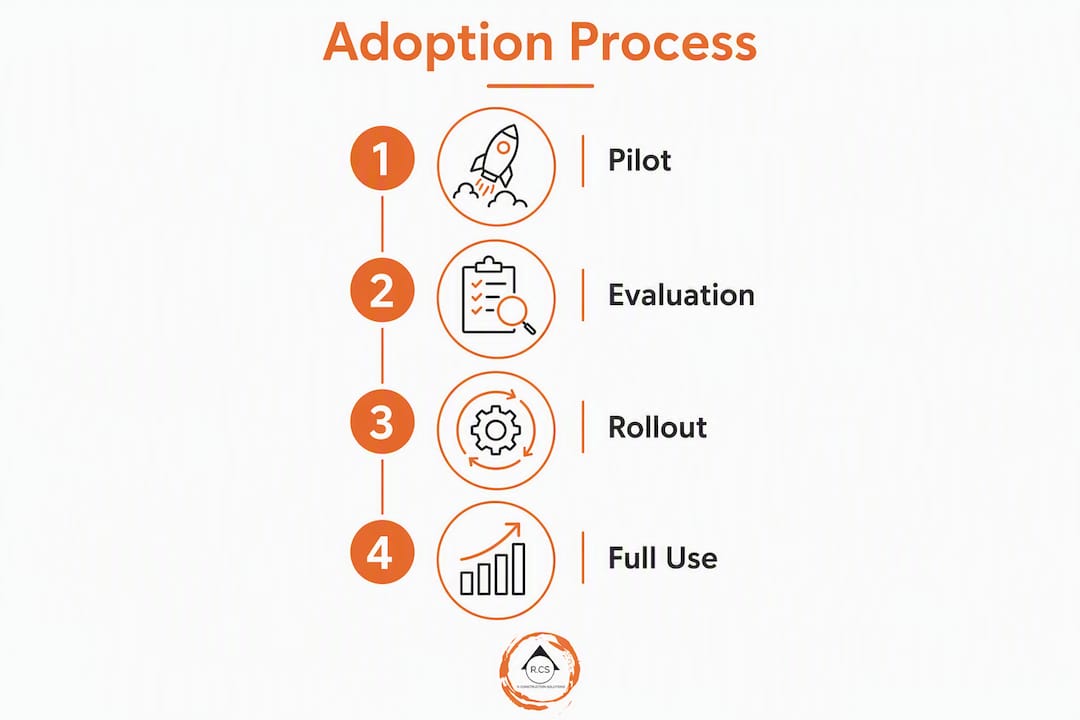
Implementation follows a predictable four-phase arc. The timeline varies by team size and how much your current workflow depends on manual processes, but the phases are consistent.
Phase 1: Pilot (Weeks 1–4). One estimator, one real project, one tool. The goal is an honest accuracy read against known quantities, not a showcase. Use a completed project with final quantities you trust.
Phase 2: Pilot evaluation (Weeks 5–6). Compare AI output to actual quantities. Measure time spent on the takeoff versus your manual baseline. Identify the gap between AI detection and your review time. If the tool saves meaningful hours and the accuracy is within your acceptable margin, proceed.
Phase 3: Narrow rollout (Weeks 7–12). Expand to two or three estimators on live bids. Run the AI output alongside your existing process, not instead of it. This phase surfaces integration issues, training gaps, and workflow friction before they affect a real bid deadline.
Phase 4: Full rollout (Month 4 onward). Retire the parallel process. Establish a standard review protocol. Track bid volume, cost-per-bid, and estimator hours monthly.
ROI calculation: the bid volume driver
AI-powered takeoff can significantly reduce estimator time per bid according to documented comparisons. The financial case is not primarily about labor savings on a single bid. It is about what your estimating team can do with the recovered hours.
A team that previously completed 8 bids per month at 20 hours each now has capacity for significantly more bids at the same headcount. Analysts report ROI often pays for a license within the first month when bid volume increases materially. For a firm winning contracts at a typical close rate, adding more qualified bids per month changes the revenue trajectory without adding an estimator.
The best ROI comes from increased bid volume rather than purely from labor-hour savings. Freeing estimators to pursue more opportunities is the core business case. Pair this with construction bid automation best practices to maximize the return.
Pro Tip: Track cost-per-bid before and after implementation, not just hours saved. Cost-per-bid accounts for software cost, training time, and review time together, and it is the metric that makes the ROI case to a firm owner.
What does automated takeoff software actually cost, including hidden fees?
The published license price is rarely the full number. Here is what the total end-to-end cost looks like for a mid-market estimating team.
License cost. Entry-level tools have a lower annual cost, mid-market platforms cost more annually, and enterprise solutions with BIM support and multi-user collaboration are the highest priced. Per-seat pricing at the enterprise tier can multiply quickly for larger teams.
Onboarding and training. Most vendors offer onboarding programs, but the depth varies. Platforms with construction-experienced trainers (Autodesk, ConstructConnect) tend to have structured programs. Newer AI-first tools often rely on self-serve documentation and chat support. Plan for a significant amount of estimator time for initial training depending on the platform’s complexity.
Integration work. Connecting takeoff output to your estimating system (Sage, Procore, Excel-based templates, or a custom ERP) may require IT time or a vendor integration fee. Ask for the exact integration documentation before signing. Closed export formats that require manual copy-paste eliminate much of the efficiency gain.
Ongoing support tiers. Many vendors offer tiered support: basic (chat/email), standard (phone + chat), and premium (dedicated account manager). Premium support at the enterprise tier adds cost but is worth it for teams running high-stakes bids on tight timelines.
Update and version costs. Cloud-based tools typically include updates in the subscription. Desktop tools may charge for major version upgrades. Confirm this in the contract.
Hidden per-project fees. Some platforms charge per project or per plan set on top of the base subscription. This fee structure can make the tool expensive for high-volume bidders. Read the contract carefully and model your actual bid volume against the fee structure before signing.
The meaningful metric is cost-per-bid: total annual software and support cost divided by the number of bids completed. The cost-per-bid depends on the total software cost divided by bids completed; higher capacity tools generally reduce cost-per-bid. Understanding how estimating software connects to downstream workflows is what makes that cost-per-bid calculation accurate.
Key Takeaways
The best automated takeoff software for your team is the one that fits your trade, your integration stack, and your bid volume goals — not the one with the longest feature list.
| Point | Details |
|---|---|
| Match tool to workflow | Choose by trade type, integration stack, and bid volume — not feature count alone. |
| Audit trail is non-negotiable | Every quantity must trace back to its drawing location; confirm this live in the demo. |
| Pilot on a real project | Use a completed project with known quantities, not vendor-supplied sample files, for an honest accuracy test. |
| Cost-per-bid is the right metric | Divide total annual software and support cost by bids completed to compare tools fairly. |
| R Construction Solutions LLC | Provides tool selection, pilot design, and estimating support to help contractors choose and implement the right takeoff platform. |
What most estimators get wrong about AI takeoff tools
The conversation around automated takeoff software tends to focus on speed, and speed matters. But the estimators who get the most out of these tools are not the ones who automate the most. They are the ones who are clearest about what they are still reviewing manually.
AI takeoff is an assist, not a handoff. On straightforward commercial drawings with clean PDFs and standard symbols, the best tools perform impressively. On MEP-heavy, industrial, or renovation projects with layered drawings and non-standard notation, senior estimator review is not optional. Tools that offer confidence scoring and a clear override workflow are safer to adopt precisely because they make that boundary explicit rather than hiding it behind a clean output.
The other thing most teams underestimate is the change-detection question. Estimators spend a surprising amount of time on addenda, not on the original takeoff. A tool that can identify what changed between drawing revisions and update only the affected quantities is worth more in practice than a tool that is marginally faster on the initial pass. Plan versioning is the real efficiency differentiator for teams managing active projects with frequent drawing updates.
The sequenced workflow that produces the best practical results for mid-sized contractors is straightforward: AI handles volume, estimators handle risk and judgment. That division of labor is not a compromise. It is the right architecture for a team that wants to bid more without sacrificing accuracy on the jobs that matter.
R Construction Solutions LLC helps you choose and implement the right takeoff tool
Picking the right takeoff platform is a workflow decision, not just a software purchase. The wrong choice costs you in training time, integration rework, and estimator frustration at exactly the moment you need your team focused on winning bids.

R Construction Solutions LLC works with growth-stage contractors to evaluate, select, and implement automated takeoff tools that fit their actual estimating workflow. That means reviewing your current bid process, identifying the integration points that matter (Sage, Procore, Excel, or your ERP), designing a pilot using your real project data, and supporting your team through rollout. No generic software recommendations. No vendor-aligned advice. Just a clear-eyed assessment of what fits your trade, your volume, and your budget.
The firm also provides estimating support and bid preparation for contractors who need immediate capacity while a new tool is being evaluated or implemented. Book a discovery call at rconstructionsolutions.com to discuss your current estimating workflow and get a concrete recommendation.
Sources and vendor pages to bookmark
| Resource | Why It’s Worth Bookmarking |
|---|---|
| AI Takeoff Software for Construction: How Automated Estimating Works in 2026 | ROI benchmarks and bid volume analysis for AI-powered takeoff |
| Automated Quantity Takeoff from PDF: A GC’s 2026 Guide | Pricing ranges, change-detection guidance, and versioning best practices |
| AI Takeoff Software: The Complete 2026 Guide for Contractors | Trade-specific AI model guidance and deployment considerations |
| AI vs Manual Construction Takeoff: Which Wins in 2026? | Accuracy benchmarking and the case for a sequenced AI-plus-human workflow |
| AI Quantity Takeoff Software | Pilot methodology: why real past projects beat vendor sample files |
| 5 Questions to Ask When Choosing Construction Takeoff Software | Vendor evaluation criteria with a focus on support quality |
| The Key Benefits of Using Automated Takeoff Software in Preconstruction | Auditability and integration requirements for preconstruction teams |
- Construction Workflow Optimization: A 2026 Guide for Contractors — phased rollout and change management guidance for software implementation.
- Build an Estimating Checklist for General Contractor Projects — checklist elements and demo questions for evaluating takeoff tools.
- R Construction Solutions LLC — Construction Consulting Services — selection, pilot design, and implementation support for contractors evaluating automated takeoff platforms.

