
Top EdgeEstimates.com Alternatives for Contractors: 2026 Guide | R. Construction Solutions
What are the top edgeestimates.com alternatives for U.S. contractors?
Before diving in, one distinction matters: edgeestimates.com (Edge Estimators) is an estimating service firm, not a software platform. If you came here looking for software alternatives to The EDGE® by Estimating Edge, you are in the right place. Contractors often confuse estimating service providers with software products, and that confusion leads to mismatched purchases. This guide covers both angles.
The strongest alternatives to The EDGE® construction estimating software in 2026 are STACK, Procore, Sage Construction Suite, ProEst, and Houzz Pro for residential work, with PlanHub, Contractor Foreman, Jobber, and R. Construction Solutions rounding out the field for specific firm sizes and needs.
| Tool | Best for | Pricing | Key features | Integrations | Business size |
|---|---|---|---|---|---|
| STACK | Cloud takeoff and bidding | Starts at free; paid plans available | Digital takeoff, bid management, cost database | QuickBooks, Procore, Excel | Small to mid-size |
| Procore | Enterprise project management | Custom quote | Takeoff, budgeting, RFIs, scheduling | BIM 360, Sage, QuickBooks | Mid to large |
| Sage Construction Suite | Accounting-integrated estimating | — | Cost database, workflows, reporting | Sage Timberline, QuickBooks | Large enterprise |
| ProEst | Cloud-based bid accuracy | Custom quote | Digital takeoff, CRM, reporting | Procore, Autodesk, QuickBooks | Mid-size to large |
| Houzz Pro | Residential remodelers | Starts at free | Proposals, mood boards, client portal | QuickBooks, Stripe | Small residential |
| PlanHub | Subcontractor bidding | Free for subs; GC plans vary | Plan distribution, bid management | Email, basic integrations | Small to mid-size |
| Contractor Foreman | All-in-one field management | — | Estimating, scheduling, time tracking | QuickBooks, Google Drive | Small to mid-size |
| Jobber | Service contractor workflows | — | Quoting, scheduling, invoicing | QuickBooks, Stripe, Zapier | Small service firms |
| R. Construction Solutions | Consulting-led estimating support | Custom engagement | AI-driven estimating, workflow consulting | Varies by client setup | Mid-size scaling firms |
Trial or demo availability varies. Procore, ProEst, and STACK all offer demos on request. Contractor Foreman provides a free trial. Houzz Pro and PlanHub have free entry tiers you can test without a credit card.
Detailed feature, pricing, and integration comparison
What features should you compare first?
The EDGE® is known for its Smart Labor Technology, which automates labor adjustments based on productivity data. When evaluating alternatives, that automation benchmark is the right starting point. Not every platform matches it, and the gap shows up in bid accuracy over time.
Key features to evaluate:
- Takeoff accuracy: STACK and ProEst both offer digital takeoff with auto-calculation. Procore’s takeoff module ties directly into its budget tools, reducing re-entry errors.
- Labor cost automation: Sage Construction Suite and ProEst allow custom labor rate databases. Contractor Foreman handles basic labor costing but lacks the depth of enterprise platforms.
- Reporting and dashboards: Sage and Procore lead here, with customizable reports that satisfy both project managers and CFOs. STACK’s reporting is solid for bid-stage work but lighter on post-award tracking.
- Customization: The EDGE® sets a high bar with manufacturer-specific component databases. ProEst and Sage come closest among alternatives, letting you build trade-specific assemblies.
- BIM and CAD integration: Procore connects natively with Autodesk BIM 360. AI-powered platforms are also emerging that convert BIM data automatically into estimating formats, cutting early-stage budget time considerably.
Integration comparison
| Tool | Accounting | BIM/CAD | Project management | Field tools |
|---|---|---|---|---|
| STACK | QuickBooks | Limited | Procore | Basic |
| Procore | Sage, QuickBooks | Autodesk BIM 360 | Native | Procore Field |
| Sage Construction | Sage Timberline | Partial | Sage Project | Limited |
| ProEst | QuickBooks, Sage | Autodesk | Procore | Limited |
| Contractor Foreman | QuickBooks | None | Native | Native mobile |
| Jobber | QuickBooks, Stripe | None | Basic | Native mobile |
Pricing and total cost of ownership
Pricing transparency varies widely. The EDGE® runs $100–$300 per user per month, with a 10-user first-year total cost of ownership in the $15,000–$30,000 range. Sage Estimating is known to have a total cost of ownership for multiple users that generally is comparable to other high-end estimating software solutions, with costs varying by firm and implementation. STACK and Contractor Foreman are more accessible for smaller firms.
High-end estimating software typically involves a steep learning curve, and the staff time spent on training often costs more than the subscription itself. Factor that into your total cost calculation before signing anything.
Pro Tip: Ask every vendor for a total cost of ownership estimate that includes onboarding, training, and data migration. The license fee is rarely the biggest line item.
Migration and data import/export
Switching estimating platforms almost always means confronting proprietary database formats. Historical pricing, productivity rates, and assembly libraries rarely transfer cleanly. Most firms end up re-entering at least part of their data. Procore and Sage offer migration support services, but expect weeks of transition time regardless. STACK and Contractor Foreman use more open data formats, which makes migration somewhat easier from spreadsheet-based workflows.
Platform compatibility
Procore, STACK, ProEst, and Contractor Foreman all run in the browser with mobile apps for iOS and Android. Sage Construction Suite has a desktop-primary architecture with some cloud features. Jobber is mobile-first by design, which suits service contractors but limits complex takeoff work.
How to choose the right alternative for your construction business
Picking the wrong estimating platform costs more than the subscription fee. It costs you bids, staff morale, and months of productivity. Here is a practical framework for making the right call.
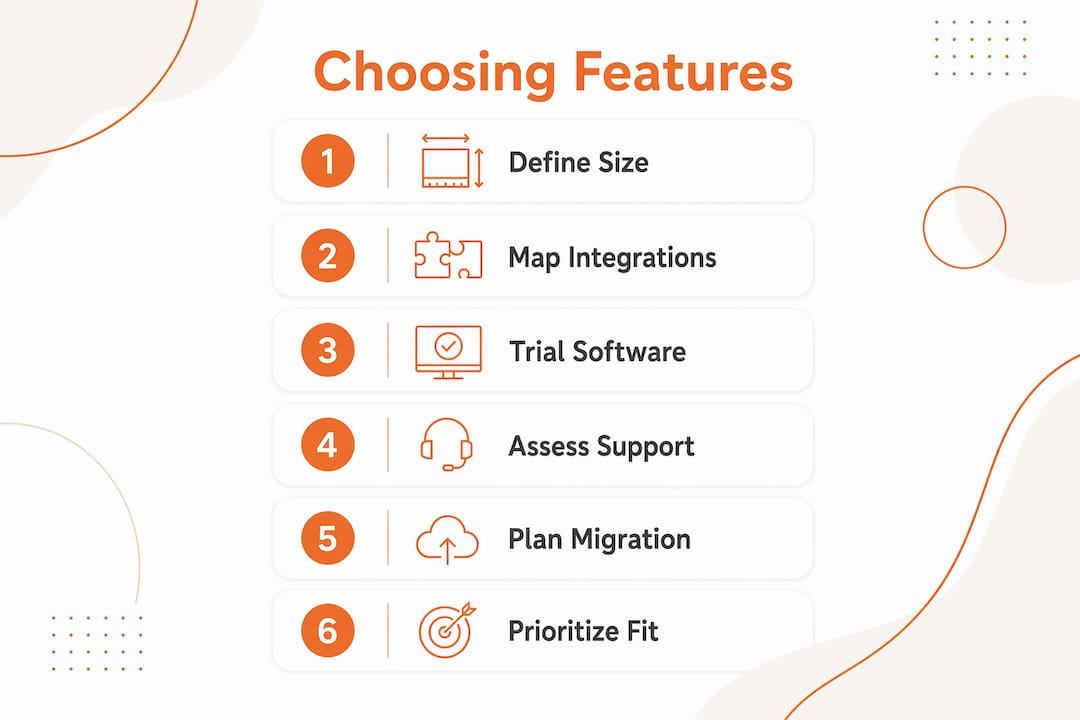
1. Define your firm’s size and trade focus first. Large firms often prefer integrated platforms with project management built in, while trade contractors typically get more value from specialized estimating tools with deep customization. A mechanical subcontractor and a general contractor have fundamentally different needs.
2. Map your integration requirements before demoing anything. If your accounting runs on QuickBooks, confirm the integration is native, not a CSV export. If your design team uses Revit or AutoCAD, BIM compatibility is a hard requirement. The shift toward active cost tracking integrated with BIM workflows means standalone takeoff tools are increasingly a short-term solution.
3. Trial the software with a real project, not a demo dataset. Every platform looks good in a vendor demo. Load one of your actual past projects and run a takeoff. That test reveals the real learning curve and whether the database matches your trade’s materials.
4. Assess vendor support honestly. Call the support line before you buy. Ask how long onboarding takes and whether a dedicated implementation specialist is included. Platforms like Procore and Sage offer structured onboarding. Smaller tools may leave you with documentation and a chat bot.
5. Plan your data migration before you commit. Identify which historical records you need to preserve: labor rates, material pricing, project templates. Data migration from proprietary databases is a frequent challenge, and some vendors charge extra for conversion services. Build that cost and time into your decision.
6. Prioritize functional fit over feature count. Focusing on functional requirements like BIM reporting and trade-specific cost databases reduces overhead and improves bid conversion. A platform with 200 features you will never use creates complexity, not capability.
Pro Tip: Run a 30-day parallel test. Keep your current workflow running while a small team pilots the new platform on live bids. The comparison will tell you more than any analyst report.
A closer look at each alternative
STACK excels at cloud-based digital takeoff for commercial and specialty contractors. Its free tier lets small firms test the core takeoff tools without financial commitment, and the paid tiers add bid management and cost database access. The interface is one of the more intuitive in the market.

Procore is the enterprise standard for a reason. Its takeoff module, budget tracking, RFI management, and field tools all live in one platform. The trade-off is cost and complexity. Smaller firms often find they are paying for capabilities they will not use for years.
Sage Construction Suite suits firms that need estimating and accounting tightly linked. Exporting data between Sage Estimating and Sage Timberline is straightforward, and the reporting tools satisfy auditors and project owners alike. Setup is complex, and the learning curve is real.
ProEst targets mid-size commercial contractors who want cloud-based takeoff with CRM features built in. The ability to track bid history and client relationships alongside estimates is a genuine differentiator for firms managing large bid pipelines.
Houzz Pro serves residential remodelers and design-build firms. Its client portal, mood boards, and proposal tools are purpose-built for homeowner-facing work. It is not a commercial estimating platform, but for the right firm type it removes significant administrative friction.
PlanHub focuses on the bid distribution side of the market. Subcontractors can receive and respond to bid invitations at no cost, making it a useful tool for firms that want more bid opportunities without heavy software investment.
Contractor Foreman packs estimating, scheduling, time tracking, and client management into one platform at a price point accessible to smaller firms. It lacks the depth of Procore or Sage for complex commercial work, but for a 5–20 person contractor it covers the essentials well.
Jobber is built for service contractors: HVAC, plumbing, electrical, and similar trades that run high-volume, shorter-duration jobs. Its quoting and scheduling tools are polished, and the mobile app is genuinely field-ready.
What verified user reviews reveal about these platforms
User feedback across platforms like Capterra and ITQlick surfaces consistent patterns worth knowing before you commit.
STACK users consistently praise the takeoff speed and the ability to share plans with subcontractors directly through the platform. The most common complaint is that the cost database requires significant customization before it reflects local pricing accurately.

Procore earns high marks for its breadth and its mobile field tools. Negative reviews cluster around implementation time and the cost of adding modules. Users at smaller firms frequently note they feel oversold on capabilities they do not need.
Sage Construction Suite reviews highlight the reporting depth and the accounting integration as genuine strengths. Setup complexity and the need for dedicated IT support appear repeatedly in critical reviews, consistent with the steep learning curve common to enterprise platforms.
Contractor Foreman draws strong ratings from small contractors who appreciate the all-in-one approach at an accessible price. Users note that customer support response times can vary, and the estimating module is less powerful than dedicated estimating tools.
Jobber holds consistently high satisfaction scores among service trade contractors. Users cite the clean mobile experience and QuickBooks sync as top strengths. The platform’s limitations show up for firms doing complex multi-phase commercial work.
Verified review aggregators like Trustpilot and Capterra are worth checking for current ratings, since software quality shifts with each product update cycle.
What the construction estimating software market is actually telling you
The market is moving away from standalone takeoff tools toward platforms where estimating, field tracking, and project financials share a single data layer. That shift has real implications for which software you choose today.
The most telling trend is the rise of AI-driven estimating. Platforms built around active estimating convert early-stage design data into construction-ready budgets automatically, reducing the manual work that has historically consumed estimators’ time. The firms adopting these tools are not just saving hours. They are changing when in the project lifecycle estimating happens, which gives them a competitive edge in design-build and negotiated contract markets.
The tension between all-in-one platforms and specialized tools is not going away. Company scale and trade specialization remain the primary drivers of that choice. A 15-person roofing contractor and a 200-person general contractor are not shopping for the same tool, even if both are searching for alternatives to The EDGE®.
One pattern that catches firms off guard: the platforms with the most features are rarely the ones that improve bid win rates the fastest. Overly complex software creates adoption resistance, and an estimator who reverts to spreadsheets because the new platform is too slow to learn is worse than no software change at all. The firms that see the fastest gains tend to pick a platform that fits 80% of their workflow out of the box and customize from there.
Key Takeaways
The best alternative to The EDGE® construction estimating software depends on your firm’s size, trade focus, and integration requirements, not on feature count alone.
| Point | Details |
|---|---|
| Match tool to firm size | Large firms benefit from integrated platforms; trade contractors gain more from specialized estimating tools. |
| Factor in total cost | Learning curve and migration time often exceed subscription costs; budget for both before committing. |
| Prioritize integration fit | BIM, accounting, and project management integrations determine long-term workflow value more than standalone features. |
| Trial with real projects | Test any platform using an actual past project, not a vendor demo dataset, to reveal the true learning curve. |
| Rconstructionsolutions for scaling firms | Mid-size contractors scaling from $5M to $50M benefit from Rconstructionsolutions’ consulting-led approach to estimating and workflow optimization. |
Rconstructionsolutions helps you choose and implement the right estimating approach
Picking software is only half the problem. The other half is making sure your team actually uses it, your workflows are set up correctly, and your estimating process produces bids that win work at the margins you need.

Rconstructionsolutions brings over 30 years of hands-on construction operations experience to that second half. Rather than leaving you with a software license and a user manual, the team works directly with your estimators to map your current workflow, identify where bids are losing accuracy or time, and configure your chosen platform around how your firm actually operates. Mid-size contractors who have worked with Rconstructionsolutions have scaled from $5 million to $50 million in revenue by pairing the right tools with the right processes. If you are ready to move past the software comparison stage and into real implementation, explore the consulting services at Rconstructionsolutions and book a discovery call to see what a tailored estimating strategy looks like for your firm.

