
How to Streamline Small Construction Project Scheduling
Start proportional scheduling: build a lightweight baseline sized to the job, assign one schedule owner, add buffers only where risk is real, and update the plan daily or weekly instead of monthly. This single shift, matching schedule detail to project size instead of copying enterprise-level templates onto a $75,000 remodel, is what actually keeps small jobs on track.
Most schedule drift on small projects doesn’t come from bad estimating. It comes from tools and processes built for jobs ten times the size, then abandoned within a month because nobody has time to maintain them.
Here’s what to do this week:
- Build a one-page task list or simple Gantt chart scaled to your project size, not a 40-tab enterprise template.
- Name one person, not a committee, as the schedule owner responsible for keeping it current.
- Place buffers only around permits, inspections, and material deliveries, the three places small jobs actually lose days.
- Use a mobile app so field updates hit the master schedule the same day, not the same week.
Key Takeaways
Proportional scheduling, matching schedule detail and tooling to project size rather than copying enterprise processes onto small jobs, is the single biggest lever small contractors have to control timelines and cash flow.
| Point | Details |
|---|---|
| Match tool to project size | Use a one-page baseline for jobs under $100,000 and a short Gantt with daily updates for $100,000 to $1 million jobs. |
| Assign one schedule owner | A single accountable person keeps updates consistent; shared ownership almost always fails within weeks. |
| Buffer high-risk points only | Add buffers around permits, inspections, and deliveries rather than padding every task. |
| Log change orders same-day | Record scope, schedule impact, and approval date immediately to prevent field-office disconnects. |
| Get advisory support for rollout | R Construction Solutions LLC offers fixed-fee, 4 to 6 week engagements to build templates and train teams on proportional scheduling. |
Table of Contents
- Why Streamlined Scheduling Matters for Small Construction Projects
- Core Scheduling Methods and Features Small Contractors Actually Need
- A Step-by-Step Scheduling Workflow For Small Projects
- How to Choose the Right Scheduling Approach for Your Company
- How Proportional Scheduling Worked on a Small Job
- Checklist and Templates You Can Use Today
- What Scheduling Tools and Processes Actually Cost
- Field-Office Communication and Change-Order Handling
- What Contractors Get Wrong When They Adopt New Scheduling Discipline
- How R Construction Solutions LLC Helps You Build This System
- Sources
Why Streamlined Scheduling Matters for Small Construction Projects
Poor scheduling doesn’t just cost you days. It costs you cash. A crew standing idle waiting on a delayed delivery still gets paid, and the next job on your calendar slides back to cover it. For a contractor running two or three jobs at once, one bad schedule can jam the whole pipeline.
A systematic review of construction project outcomes found that projects run without structured scheduling tools reported average budget overruns, and that the payoff from any given tool depends heavily on whether the crew actually uses its features and whether the organization is ready to adopt them. That second part matters more than most contractors realize: buying software doesn’t fix a scheduling problem. Using it consistently does.
Labor scarcity raises the stakes further. The Associated Builders and Contractors reported a construction workforce shortage topping a significant number of workers, which means every idle crew day is harder to recover than it was five years ago. You can’t just throw more labor at a slipping schedule anymore.
Proportional scheduling addresses both problems at once:
- It improves resource allocation, so crews and subcontractors show up when the job is actually ready for them.
- It reduces rework, because dependencies get documented instead of assumed.
- It protects cash flow, since fewer idle days mean fewer draws burned on delays instead of progress.
- It avoids the over-engineering trap, where a small contractor builds a schedule so complex nobody updates it past week two.
Core Scheduling Methods and Features Small Contractors Actually Need
You don’t need critical path method software to schedule a kitchen remodel, and you can’t run a $2 million mixed-use build off sticky notes. Matching the method to the job size is the whole trick.
Gantt charts work for the vast majority of small jobs. Critical Path Method (CPM), sometimes shown using the Precedence Diagramming Method (PDM) notation, becomes worth the effort once you have enough interdependent tasks that a delay in one clearly cascades into others, typically once a project crosses into multi-month, multi-trade territory.
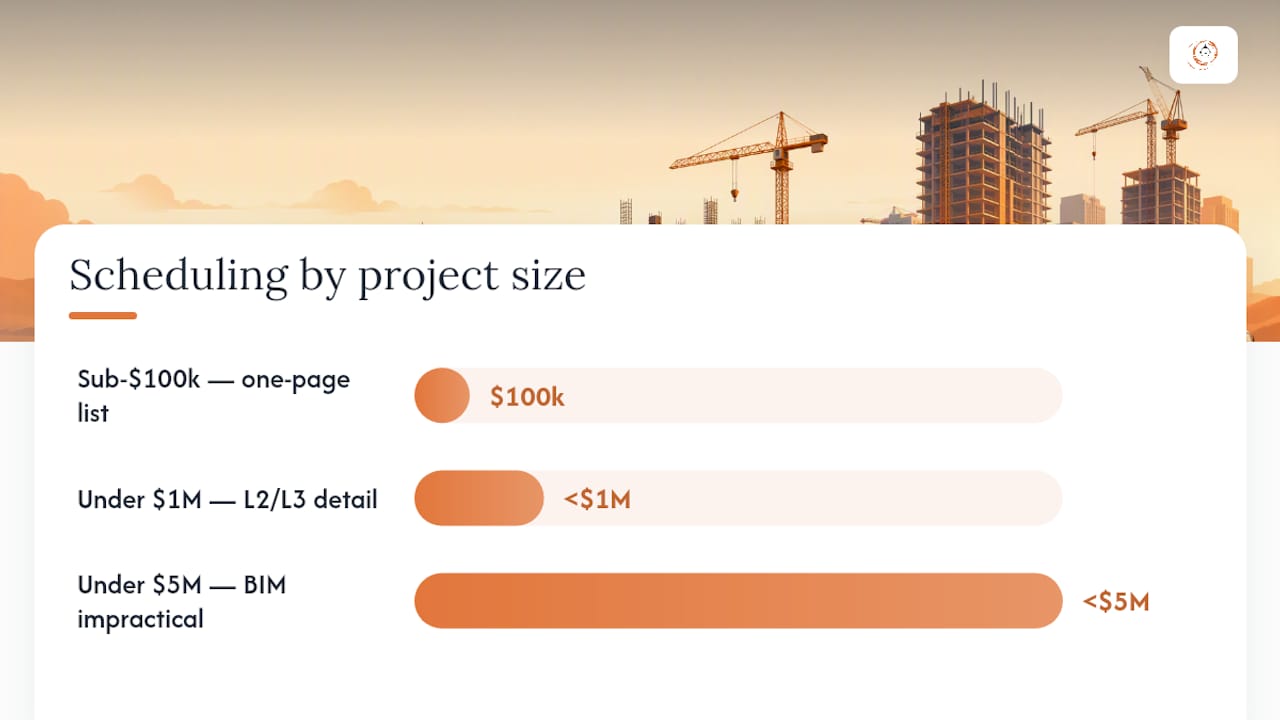
Industry planners also talk about schedule detail in levels, often labeled L1 through L4. L1 is a milestone-only summary for owners and lenders. L2 breaks that into major phases. L3 gets down to weekly task detail for the field. L4 is day-by-day granularity, usually reserved for large commercial work with dozens of trades on-site simultaneously. Most jobs under $1 million never need to go past L2 or L3.
The essential feature set for small contractor software is shorter than most vendors want you to believe:
- Mobile status updates so field crews can mark tasks complete without a laptop.
- Real-time progress tracking that updates the master schedule automatically.
- Reusable templates for repeat job types (kitchen remodels, small commercial buildouts, roof replacements).
- Basic resource tracking, so you can see if two jobs are both counting on the same crew the same week.
- Integration with your estimating or accounting system, so schedule changes don’t require re-entering data twice.
Building Information Modeling (BIM) with 4D scheduling overlays can sharpen quantity take-offs and visualize sequencing beautifully. BIM’s biggest limitation for small firms is time: creating the informative models these tools need is often manual and time-consuming, which makes full BIM integration impractical for most contractors under $5 million in revenue. Save it for jobs complex enough to justify the setup.
Pro Tip: Match your documentation to your job size. A sub-$100,000 remodel needs a one-page task list, not a 200-line CPM network. Building more schedule than the job requires guarantees nobody keeps it updated past the second week.
Scale schedule documentation and process to match project size rather than applying enterprise-scale processes to small jobs. That single discipline prevents both over-engineering and under-management, the two most common scheduling failures in small contracting firms.
A Step-by-Step Scheduling Workflow For Small Projects
Here’s the proportional workflow we recommend to contractors trying to get control of their timelines without adding administrative overhead:
- Break down scope. List every major task and deliverable before you assign a single date.
- Build the baseline. Turn that list into a Gantt chart or task sheet with durations and dependencies.
- Assign a single owner. One person tracks and updates the schedule, no committees, no shared responsibility that nobody actually holds.
- Set your update cadence. Daily for jobs under 8 weeks, weekly for longer ones.
- Handle changes as they happen. Log every change order against the schedule the day it’s approved, not at the next status meeting.
- Close out formally. Compare actual dates against baseline dates to see where you lost or gained time, and keep that record for the next bid.
A 10-week kitchen and bath remodel might look like this: Week 1 for demo and rough framing, Weeks 2 to 3 for rough plumbing and electrical with a two-day buffer built in for inspection scheduling, Weeks 4 to 6 for drywall and finish carpentry, Weeks 7 to 8 for tile and cabinetry with a buffer for material delivery delays, and Weeks 9 to 10 for punch list and final walkthrough.
Buffers belong at the specific points where small jobs actually lose time:
- Permit review and inspection scheduling, since municipal timelines are outside your control.
- Material and appliance deliveries, especially custom orders with long lead times.
- Weather-exposed exterior work, if the schedule spans seasons.
Keep dependency documentation light. A low-cost VBA-Excel matrix model can automate that dependency handling for smaller task sets, giving you accurate schedule calculations without buying dedicated software, though the approach slows down once task counts climb into the hundreds.
How to Choose the Right Scheduling Approach for Your Company
The right tool depends entirely on your typical project size, not on which software has the longest feature list. Match the tool to the job, not the other way around.
Run through this checklist before you commit to anything:
- Does the project scale (sub-$100k, $100k to $1M, above $1M) match what this tool was actually built for?
- Does it work offline or with poor signal on a job site, not just in an office with Wi-Fi?
- Can your field supervisor update it from a phone in under two minutes?
- Does it come with usable templates, or does someone need to build the schedule structure from scratch every time?
- Does it talk to your estimating or accounting software, or will you be double-entering data?
- Is the pricing per-user, flat monthly, or one-time, and does that math work at your crew size?
Red flags that should send you looking elsewhere: any tool that requires a dedicated administrator to maintain, any setup process measured in weeks instead of hours, and any system without a real mobile app for field updates.
Think in three generic categories rather than chasing specific brand names. Entry-level field apps suit contractors running one or two jobs at a time who need mobile updates and simple templates more than analytics. Integrated project management suites fit firms juggling multiple concurrent jobs who need resource tracking across projects and tighter accounting integration. Spreadsheet automations, like the VBA-Excel matrix models mentioned earlier, suit contractors who want dependency tracking without a subscription cost and are comfortable in Excel.
Pro Tip: Before buying anything, run your last completed project through whatever tool you’re evaluating. If it takes more than an hour to build that schedule retroactively, it’s too heavy for your current operation.
For guidance on where estimating accuracy intersects with your schedule, our estimating checklist for general contractor projects walks through the crew, subcontractor, and delivery details that feed directly into your task durations.
How Proportional Scheduling Worked on a Small Job
Rowena Tulacz has spent more than 30 years in construction operations, business development, and executive advisory roles, working with contracting firms as an outside advisor rather than a tradesperson. Her focus has always been the business side of construction: job costing, workflow, and the systems that keep a growing contracting firm from tripping over its own success.
In one advisory engagement with a small remodeling contractor, the team was working almost entirely from memory and text messages, with no written schedule at all. R Construction Solutions LLC helped the firm build a one-page baseline template for each job, assigned a single schedule owner per project, and instituted a weekly ten-minute review between the office and field.
Structured change-order management, realistic resource planning, and targeted buffer allocation can rapidly improve on-time delivery and resolve cash-flow strain, even without new software.
Within six months, on-time completion moved from roughly 60% to 95% in a comparable documented case, and cash-flow pressure eased because fewer jobs were sliding into overlapping delay periods.
Three lessons carried over from that engagement:
- A one-page baseline beats no baseline, every single time, regardless of job complexity.
- One accountable owner produces better updates than a shared responsibility nobody actually holds.
- A ten-minute weekly review catches drift long before it becomes a missed deadline.
Checklist and Templates You Can Use Today
You don’t need custom software to start. A spreadsheet with the right fields does most of the work.
Your one-page baseline template needs six fields: Task, Duration, Owner, Dependency (what must finish first), Buffer (days added for risk), and Status (not started, in progress, complete, blocked).
Daily supervisor checklist:
- Mark yesterday’s tasks complete or flag them as delayed.
- Note any dependency that’s now at risk because of today’s delay.
- Flag material or inspection needs for the next 48 hours.
- Send a one-line update to the schedule owner before leaving site.
Weekly owner review checklist:
- Compare actual progress against the baseline for every active task.
- Log any change orders approved that week against the schedule.
- Adjust buffers if a risk area (permits, deliveries) is trending late.
- Communicate any date shifts to the client before they ask.
For a broader field-tested version of this format, the construction scheduling checklist for contractors offers additional line items worth adapting to your own job types. If most of your work is residential, the home project planning checklist covers similar ground from the homeowner-facing side, useful if you want to align client expectations with your internal schedule.
R Construction Solutions LLC’s full baseline and review templates, built specifically for contractors under $10 million in revenue, are available through our consulting services page.
What Scheduling Tools and Processes Actually Cost
Budget and timeline expectations should scale with the tool, not the other way around.
- Spreadsheet or basic field app: Little to no cost, adoptable the same day, best for jobs under $100,000 or firms testing discipline before investing further.
- Mid-tier project management tool: Monthly per-user subscription pricing, typically a 4 to 8 week rollout including team training, best for firms running several concurrent $100,000 to $1 million jobs.
- Advisory-led implementation: A fixed-fee engagement to design the process and train the team, typically embedded fully within 3 to 6 months, best for firms scaling past $1 million in annual revenue with multiple project managers.
“Good enough” at the low end means a maintained one-page schedule updated daily. At the mid-tier, it means a schedule everyone on the team checks without being reminded. At the advisory level, it means the process survives a change in project manager without falling apart.
Field-Office Communication and Change-Order Handling
Nothing wrecks a schedule faster than a change order that lives in someone’s inbox instead of the schedule itself. The fix is procedural, not technological.

Every change order needs three things logged the day it’s approved: the new scope, the schedule impact in days, and which downstream tasks now shift. If a change adds three days to rough plumbing, that delay needs to ripple into the drywall start date the same day, not at the next site meeting.
The office-to-field gap is where most small contractors lose the thread. A supervisor who updates the schedule at day’s end but doesn’t hear back about a client-approved change until two days later is already working from outdated information. The fix is a same-day communication loop: the person approving change orders in the office and the person running the schedule in the field need one shared update point, whether that’s a shared app or a daily five-minute call.
Miscommunication and unrealistic timelines rank among the most common barriers small and mid-sized construction firms face when adopting project management discipline. Most of that friction traces back to information sitting in one place and not reaching the other.
Keep a simple change-order log alongside your baseline template. Date, description, days added or removed, and who approved it. That single sheet resolves more billing disputes and schedule arguments than any software feature ever will.
What Contractors Get Wrong When They Adopt New Scheduling Discipline
The most common mistake I see is contractors copying a process they saw at a larger firm, full CPM networks, dedicated schedulers, weekly steering committees, and trying to run it on a five-person crew. It collapses within a month because nobody has the bandwidth to maintain it.
Pick one accountable owner for the schedule, not a rotating cast. And protect the first 30 days after rollout deliberately.
Pro Tip: Schedule a five-minute check-in every single day for the first month, even when nothing’s changed. Momentum dies fastest in week two, right after the initial excitement wears off.
How R Construction Solutions LLC Helps You Build This System
Reading about proportional scheduling is one thing. Getting your team to actually run it, daily, without falling back into old habits, is the harder part. That’s where R Construction Solutions LLC’s process improvement and workflow optimization services come in: we help contracting firms design the baseline templates, ownership structure, and update cadence that fit their actual job size, not a system borrowed from a firm three times their revenue.

A typical engagement runs as a fixed-fee, 4 to 6 week kickoff: we audit your current scheduling habits, build your baseline and change-order templates, train your office and field teams on the update cadence, and stay on for a short advisory window while the process beds in. For firms further along in their process work, our process improvement case study shows how a similar structured approach played out beyond scheduling alone.
If your schedules are living in someone’s head instead of on paper, book a discovery call through our construction consulting services page and we’ll map out what proportional scheduling looks like for your specific project size.
Sources
The claims in this article draw on peer-reviewed research and industry guidance worth deeper study:
- The real reason construction schedule issues can derail small contractors (and how to fight back)

